Tracker-driven dispatch
Polls GitHub Projects or Linear for active issues, filters candidates, respects terminal states, and keeps tracker state reconciled.
A headless orchestrator that polls GitHub or Linear, dispatches parallel agent workers in isolated workspaces, and drives tickets through implementation, review, rework, and merge.
Issue-to-PR orchestrator
Polls GitHub Projects or Linear for active issues, filters candidates, respects terminal states, and keeps tracker state reconciled.
Creates local, cloned, worktree, Docker, or SSH-backed workspaces and starts the configured Pi or Codex runner per issue.
Handles concurrency limits, retries with exponential backoff, stall detection, escalations, hooks, and structured logs.
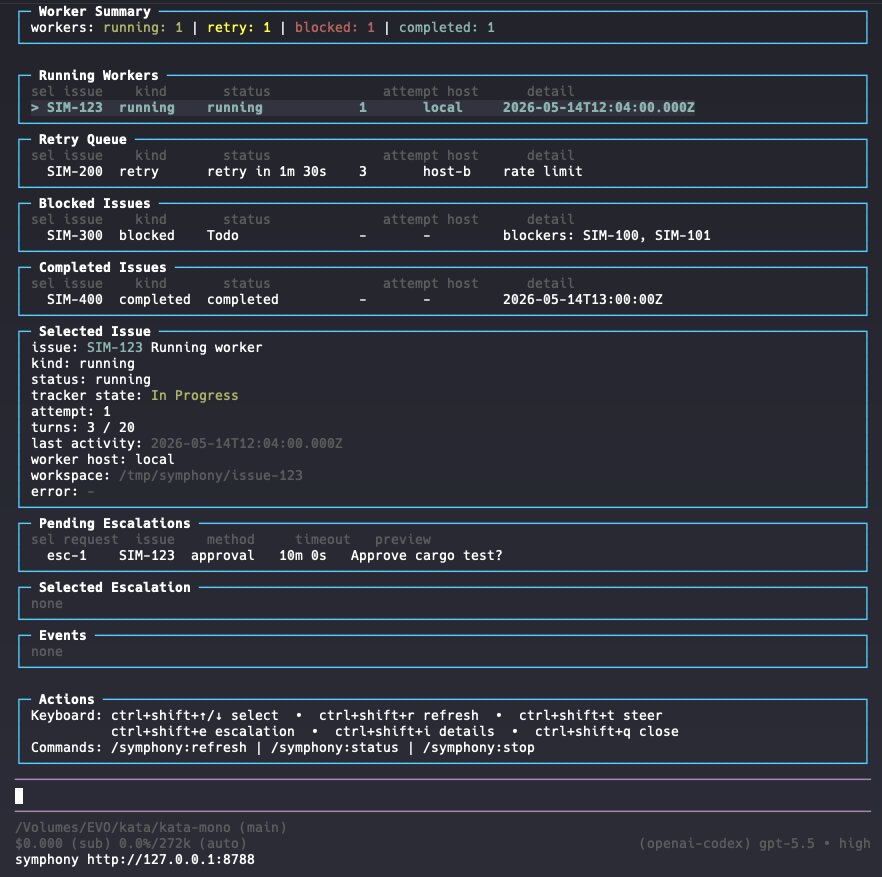
The Pi extension adds /symphony commands, start and attach flows, refresh, steer, escalation response, and a live console inside Pi.
Quick start
Initialize a workflow in your repository, point it at a tracker, and let workers claim issues. Drive it headless on a server or attach from the Pi extension.
$ cargo build --release
$ symphony init
$ GH_TOKEN=… symphony --port 8788Pi-native
The Pi extension adds /symphony commands plus a live console
for running workers, the retry queue, blocked issues, completed work, and
pending escalations, without leaving your agent.
$ pi install npm:@kata-sh/pi-symphony-extension
/symphony:start Launch the orchestrator./symphony:status Refresh the live console./symphony:steer Redirect a running worker./symphony:escalation Respond to a blocked issue.Planning companion
Kata CLI feeds Symphony with specs, slices, and task plans. It is a companion, not a separate product. Symphony is the surface for unattended issue execution, worker lifecycle, and tracker reconciliation.
Built in the open
Kata Symphony is open source. Build it, point it at your tracker, and run it on a server or beside your agent.